

ROKKU VIDEO SURVEILLANCE
FOR HOME AND OUTDOORS
Wi-Fi and 4G SIM-card models, powered by mains or a solar panel
— for indoor and outdoor use
- 10,000+ customersacross Kazakhstan
- Official warranty12 months, 2 years on the Zoom line
- Free memory cardmicroSDXC 64 GB, U3 class


INSTALLED IN 15 MINUTES
Four steps — no technician, no special tools. That's how 9 out of 10 of our customers do it.
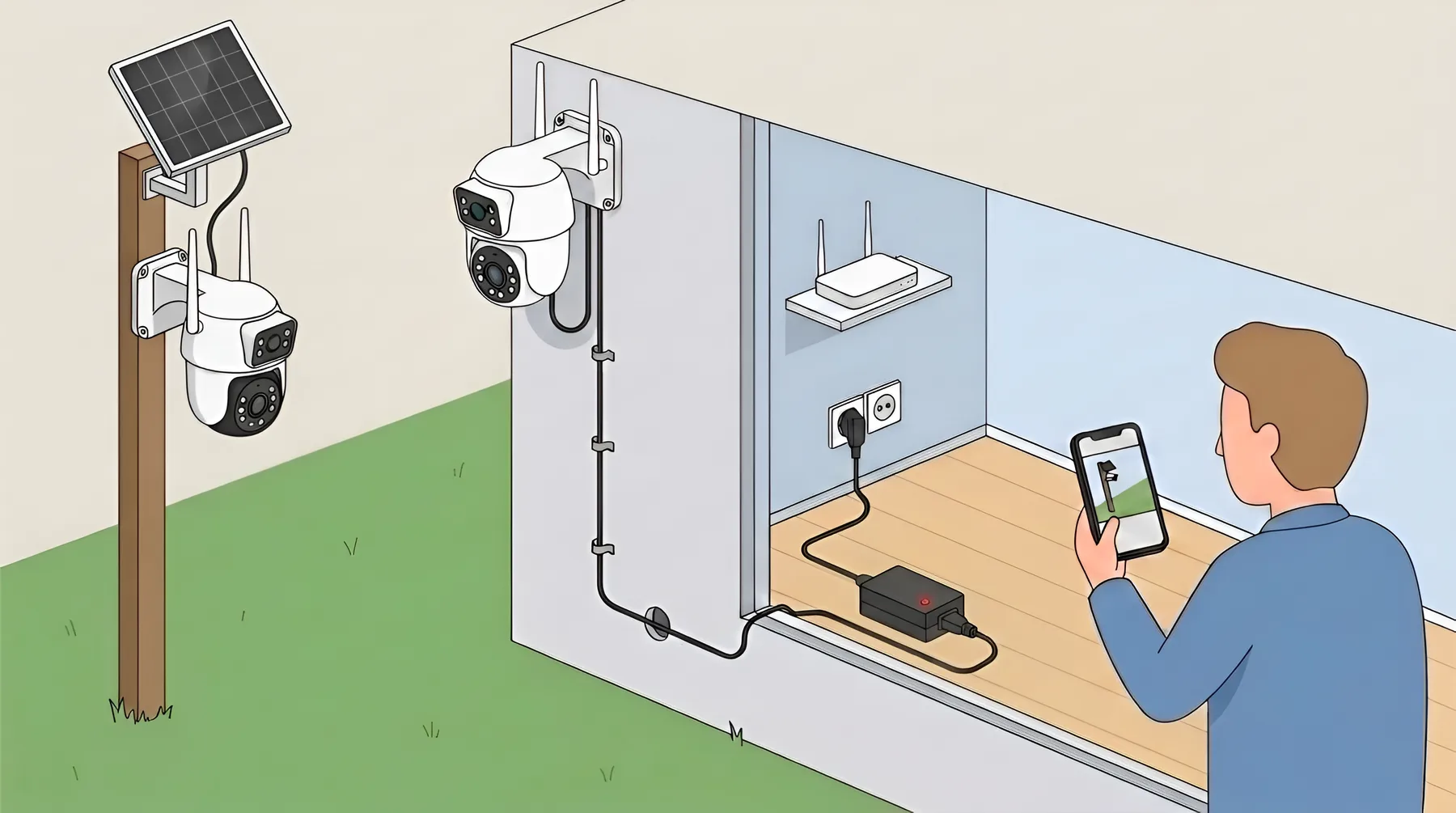
Tap a dot to see a tip
1
Camera
On the wall or under the roof, 2.5–3 m high. Bracket and screws are in the box.
- 1
Mount the camera
≈ 5 minutesBracket and screws are in the box. Wall, pole or ceiling — 2.5–3 m high, tilted slightly down.
- 2
Connect power
≈ 2 minutesThe adapter stays indoors; only the cable runs outside.
- Socket nearby → adapter from the box
- Socket far away → DC extension 3–15 m
- No electricity → solar-powered model
- 3
Provide internet
≈ 1 minuteThe camera needs internet to stream video to your phone.
- Wi-Fi available → 2.4 GHz network, password
- No Wi-Fi → SIM card with a 10–30 GB plan
- 4
Pair with your phone
≈ 5 minutesInstall the app named on the box. Reset the camera first: hold the Reset button (next to the memory card slot) for 10 seconds. Then scan the QR code on the camera — and it's on your phone.
Done
Watch the camera from anywhere, get motion alerts; recordings are stored on the memory card.
OUR CAMERAS DIFFER IN A FEW KEY WAYS
By connection:
— Wi-Fi cameras — when the site has Wi-Fi— 4G cameras with a SIM card — when there is no Wi-Fi or the site is remote
By location:
— Cameras for home and office— Outdoor cameras
By power:
— Mains-powered — for continuous operation— Solar-powered — for places without electricity
By design and view:
— 1 lens — monitoring one zone— 2 lenses — two zones at once: overview + pan-tilt camera— 3 lenses — wide coverage and several zones with no blind spots
A FREE MEMORY CARD WITH EVERY ROKKU CAMERA
Every camera ships with a genuine microSDXC card made in Taiwan with its real stated capacity. The cards are rated for stable video recording and continuous camera operation.
Key features
- microSDXC, Class 10 / UHS-I U3
- Write speed from 30 MB/s
- Suitable for 24/7 recording
- No dropped frames or corrupted video
- Compatible with Full HD, 2–5 MP, PTZ and night recording
- Works correctly with iCSee and V380 Pro
Why it matters
- U3 class prevents frame loss
- The card withstands constant overwriting
- The full 64 GB is available for the archive

ALL CAMERAS IN ONE APP
Watch live video, get notifications and control cameras from your smartphone (Android, iOS)
Supports the V380 Pro and iCSee apps.
- Live view and recording archive from your phone at any time
- Remote access from anywhere in the world
- Motion notifications to your smartphone
- Several cameras in one app
- Pan, zoom and two-way audio
- One camera viewable by several users


The apps are free, available for Android and iOS, and need no subscription
for core features.
FREQUENTLY ASKED QUESTIONS
ROKKU CAMERA VIDEO GUIDES
Quick setup and usage tips.
All guides are in Russian